Where localcode differs
localcode supports multi-model approval, scheduled execution, and validated multi-agent plans. This page describes capabilities that are not standard in coding agents and states the use case for each capability.
English · 한국어
Bottom line
Fourteen capabilities in two groups: task execution and client operation. Three capabilities change task execution directly:
- Adversarial review across models: up to three reviewers, each a separate agent on its own model profile, each in its own session, all of which must approve before the loop ends.
- Time-shifted work: a prompt naming a time is booked rather than run, with the time parsed by localcode instead of the model.
- Plans validated before execution: a multi-agent plan is authored as structured data and rejected in full if any stage would not work.
The rest cover cost, auditability, running on models you host yourself, and several front ends over one daemon.
Capability comparison
The right column describes what is common across coding agents in general use, not any one product. See Qualifications for how to read it.
| Capability | localcode | Common elsewhere |
|---|---|---|
| Adversarial review | Up to 3 reviewers, each a separate agent with its own model profile and its own sub-session kept across rounds, unanimous boolean approval required | One model reviewing its own output, in the same context |
| Scheduled work | Natural-language booking, time parsed by the harness, missed times reported as missed | None; a prompt runs when it is sent |
| Multi-agent plans | Plan authored into a tool schema, validated whole before execution, hard ceilings on stages, turns and wall time | Free-form delegation the model narrates and may abandon |
| Cross-conversation reference | #<name> lets the model read another session's messages, delivered as an untrusted tool result rather than spliced into the prompt | Manual copy and paste between sessions |
| Prompt auditability | /context reports every assembled piece with its source, trust class and token estimate, with no model call | The assembled prompt is not inspectable |
| Model-run commands | Off by default; on, the model may run a named built-in, custom command or skill as its own turn | Commands are typed by a person only |
| Search completeness reporting | Truncation, unreadable files and oversized lines are each named in the result | Silent truncation at a result cap |
| Per-endpoint concurrency | max_concurrent_tasks per provider, taken before the daemon-wide limit | One global concurrency number, or none |
| Failover | With Smart Agent on, a per-profile fallback chain with the request re-derived for the new model family | Retry on the same endpoint, then fail |
| Local models | Reasoning read from both runtime spellings, context window read from the server, per-family behaviour corrections | Hosted APIs first, local endpoints as a generic OpenAI shim |
| Model switching | Change model inside one conversation, across providers: a hosted model and one on your own machine are two stops in the same conversation | A model picked from one vendor's list |
| Client architecture | One daemon, three front ends (terminal, browser, native window), any number attached to the same session at once | One process per client |
| Turn navigation | Alt and the arrows move the view between your own turns, separately from prompt history recall | Scrollback search, or scrolling |
| Workspace boundary | Every path judged after symlink resolution; leaving the project is its own permission question, separate from the tool's | A single allow list of directories |
| Conversation storage | Archive that keeps the full event log and refuses only new work; rename, reorder and fork alongside it | Delete, or an unbounded list |
Task execution
1. Multi-model review
Debate
Self-review provides limited independence. Debate assigns the work to separate reviewer agents. Each reviewer uses its configured model and an independent context. Completion requires approval from every reviewer.
Use different models when model diversity is required. Reviewer profiles can point to the same model; the configuration does not prevent this.
Use case: a schema change before it reaches main
/debate girl,tom 5 migrate the session store to the new event schema- Author: this conversation's agent, keeping its history and its prompt cache.
- Reviewers:
girlandtom, each on its own model, running at the same time and unable to see each other. - Reviewer memory: one sub-session per reviewer, kept across the rounds, so a reviewer in round four still knows what it asked for in round one.
- Reviewer powers: reading, plus the project's own
verify_commandfrom config.json, with no arguments, where the project has set one. No writing at all,bashincluded. - Evidence:
git diff HEADwhere there is a repository, the tool-call list where there is not. - Approval: a boolean each reviewer sets. Anything that is not an explicit approval is not one.
- Termination: unanimous approval, the round budget, or a two-round standoff in which the author called no tool. The closing line names which.
Runtime controls:
- Round control: localcode counts and schedules review rounds. Prompt compliance does not determine the number of rounds.
- Read-only review: reviewers cannot modify the work under review.
2. Scheduled tasks
Scheduled tasks
A prompt with a supported time expression creates a scheduled task. localcode executes it at the parsed time.
Use case: an overnight run booked from the prompt box
tomorrow at 9am run the full test suite and summarise only the failures- Split: the model separates the time from the work; localcode parses the time.
- Confirmation: names the moment localcode read, not the words the model passed on.
- Forms accepted: relative, clock, named, weekday and absolute, in English and in Korean, with a bare hour meaning the nearest one.
- Refusals by name: a vague time (
later) and a repeat with no fixed length to it (every month,every 30 seconds) are each refused rather than guessed at. A repeat by the minute, hour, day or week (every day,매일 9시) is booked, with a stop condition named in the confirmation. - Execution: its own session, under the conversation's workspace and permission switches.
- Result: a row in the right panel with a light: blinking while waiting, solid for an unread answer, grey once read.
A booking fires only while localcode is running. A time that passed while it was closed is reported as missed rather than run late, because the request was for a time.
Three entry points: plain language in the prompt box, the clock button under it, or /schedule in 30 minutes run the tests. /show-scheduled-task is the same list in the terminal.
3. Validated multi-agent plans
Orchestrate
Delegation tools start other agents but do not enforce a declared procedure. A model can stop before completing every stated review. Orchestrate moves the procedure into validated data executed by localcode.
Orchestrate makes the plan data. The model authors it by filling in the tool's own input schema, so the whole plan is validated before a token is spent on running it.
| Checked before execution | Refusal |
|---|---|
| Every agent named against the roster the turn was admitted with | Whole plan, with the reason |
| Every reference against a stage that really precedes it | Whole plan, with the reason |
| Every count against its ceiling | Whole plan, with the reason |
Use case: a review where every finding must be verified
- Stage 1, fan-out: one agent per review dimension over a list.
- Stage 2, fan-out over findings: N independent copies per finding from stage 1, each declaring its return schema.
- Filter:
keepdrops every result whose named field is false. This is the adversarial filter, with no expression language anywhere. - Stage 3, barrier: sees everything that survived.
- Report: written by localcode from what happened, not summarised by a model.
Ceilings are refusals rather than truncations, except a fanout over an earlier stage's results, whose width is not known until the run: there the surplus items are dropped and the report names how many. The permission prompt shows the ceilings rather than an estimate it cannot keep:
| Limit | Value |
|---|---|
| Stages per plan | 8 |
| Agent turns per run | 32 |
| Wall time per stage | 10 min |
| Wall time per run | 30 min |
A stage names a role rather than tools, intersected with the agent's own restriction, so a plan can neither hand bash to a reviewer nor widen what an agent may do. Every stage is a synchronous child, so Esc stops the whole run.
4. Cross-conversation reference
Cross-conversation reference
The model can read the contents of a different session. Write #<name> in a prompt and the named conversation becomes readable: its prompts, its replies, and the files its tools touched. Analysis done last week in another session does not have to be repeated, and does not have to be pasted in by hand.
Use case: checking this project against a report written in another session
#S2 has the final report. Check it against the file here.- Resolution: by id, exact title, or unambiguous title prefix, including into the archive. A conversation put away last month is still referable.
- Returned content: the other conversation's transcript, requested by the model through a tool call.
- Not spliced: not one byte of the named conversation enters the message. The reference becomes localcode's own line saying the contents can be read with a tool.
- Trust class: external tool result. The transcript can contain user messages, model output, fetched pages and MCP output. None becomes an instruction in the receiving session.
- Consequence: a
#S3written inside the referenced conversation cannot resolve, and a/permission-skip-all oninside it cannot reach the router. A tool result never re-enters the message path. - Never refused: no match, several matches, or the current conversation each produce a notice and the turn continues.
A conversation belonging to another project is flagged as one, with both directories named. #42 stays an issue number. The right arrow completes a conversation name the same way it completes a command, which is what makes a renamed conversation worth naming well.
5. Specialist delegation
Smart Agent
Smart Agent delegates work to six specialists, each with a separate session and context. The main session receives their results without retaining every file they read.
| Specialist | Work |
|---|---|
explore | Find things |
librarian | Digest long material |
oracle | Review |
plan | Decompose |
implement | Make one self-contained change |
verify | Run the build |
- Context cost: the main conversation receives the specialist result, not every file the specialist read. Savings depend on result length.
- Model per specialist: worked out from the profiles already in config.json, not named in the build. A profile called
smart-quick,smart-balancedorsmart-deeppins it by hand. - No recursion: no specialist can delegate. This is a tool allowlist, not a line of prompt.
- Parallelism:
TaskBackgroundandTaskCollectrun several at once. - Directly selectable: Tab and the Web UI menu switch a conversation onto a specialist, and
localcode run --agent oracleanswers a single prompt as one.
On the 25-instance SWE-bench Verified run in the benchmark, Smart Agent on resolved 21 of 25 against 19 with it off, on the same model. That spread is inside run-to-run variance and does not rank anything; the measured difference that run does support is output tokens, 7,586 against 9,434 per instance.
6. Local models and failover
Local models and failover
Local endpoint support includes reasoning fields, server-reported context limits, request concurrency and fallback handling.
| Problem | Handling |
|---|---|
| Reasoning has no field in the OpenAI API, so every runtime invented one | Both spellings read: reasoning_content (DeepSeek, vLLM, SGLang, LM Studio, llama.cpp, Ollama) and reasoning (OpenRouter and others) |
| A local server's window is whatever was loaded, not what the model supports | Read from the server: GET /v1/models, or /props on llama.cpp |
| An endpoint supports fewer concurrent requests than the daemon | Per-provider max_concurrent_tasks, acquired before the daemon-wide slot |
| A rate limit or an expired credential ends the turn | With Smart Agent on, two retries on the failing endpoint (1s, 2s), then a per-profile fallback chain with the request re-derived for the new family |
| A request refused for length ends the turn | Summarise, then trim, shrinking until the server accepts it |
A 401 or an unknown model id skips the wait, because time does not fix those, and a malformed request retries nowhere.
7. Model switching within a conversation
Switching models mid-conversation
An agent names a profile; a profile names a provider and a model. Switching the agent switches the model, and the conversation is left alone: the next message goes to the new model carrying everything said before it, the previous model's own answers included.
Agents in one conversation can use different providers, including Bedrock and a local server. Each agent resolves its provider and model from the configured profile.
Use case: hosted-model review and local-model implementation
"agents": {
  "general-purpose": { "profile": "smart-deep" },   // Claude, through Bedrock
  "on-the-laptop":   { "profile": "local-qwen" }    // llama.cpp on localhost
}- What changes: the model, the system prompt and the tool scope, from the next message on. All three belong to the agent.
- What carries: the whole conversation. The model taking over reads what the previous one was asked and what it answered.
- How: Tab cycles in the TUI,
/agent <name>in both clients,/model <profile>changes only the model and leaves the agent's prompt, tools and permissions in place,/modelon its own lists what this conversation could answer on, and the Web UI has a selector in its header. - Recorded: the switch is an event in the session log, so it survives a restart and reads back in order with the messages around it.
Switching agents can change the system prompt and tool schemas. The first request after a switch may therefore require a new provider cache entry.
Choosing the model is separate from choosing the agent. /model <profile> points one conversation at that profile's model and keeps the agent — its prompt, its tools, its permissions — so answering on a bigger model no longer means writing a second agent that is the first one with another profile. The choice is kept per agent in each conversation, survives a fork, and is announced on a model.changed event so a second client follows it. Bare /model reports the model in force and every profile the config can reach; the terminal opens a picker with agents and models in one list (/models and /mo are aliases), and default hands the choice back to the agent.
8. Prompt inventory
Prompt inventory
The system prompt is assembled from registered assets. Each asset has a stable id, source, trust class, request placement and activation condition.
Use case: finding out what is actually being sent
/context        what the next turn would send, with no model call
/context all    and what was left out, and why
/context <id> the manifest a given model call was built from- Reported: what is included and why, per-category token estimates, tool definitions built-in and per MCP server, conversation and reserved output against the window.
- Flagged: whether the request carries content that may not be followed as instruction.
- Cost: none. No model call is made to answer it.
The same manifest ids appear in the trace, so a failover that reused the failed model's prompt is visible as an unchanged manifest id on a changed model family.
The terminal keeps the same window in view another way: the footer under the prompt box shows context: N% beside the model, warning at 70% of the window and critical at 90%. The Web UI has long had its own indicator; the terminal ignored the usage events that feed it, so it had none.
9. Execution traces
Trace
With Smart Agent on, one JSON line per event is written to ~/.localcode/trace/.
- Recorded: which model answered and on which profile, cost including cache reads and writes, which tool ran and for how long, what was delegated to whom, every failover, every compaction.
- One trace id per turn, inherited by every sub-agent. The shared id associates parent and child events in one query.
- Live:
GET /api/tracetails it while the session is open.
10. Commands the model may run
Model-invocable commands
Shipped in v0.83.0, off by default. On, the model may run a built-in, a custom command or a skill itself, each as a turn of its own in the same conversation.
Use case: cleanup the model decides is due
Read the mail. If there is anything from the release manager, run /tidy-context.- Two levels: the switch is whether; the list is which, written down separately, so turning the switch off does not discard the choices.
- Built-ins: named in
model_commandswith the slash. - Custom commands and skills: opt themselves in with
model_invocable: truein their own frontmatter. - No wildcard: the list reaches
/permission-skip-allif you write it, so it must be a name in a file. - Shell splices excluded: a command containing a backtick shell splice can never be model-invocable, and the refusal is named rather than silent.
The model decides when to run a command from what it has read: files, command output, and whatever an MCP server returned. Anything on the list is reachable from text the model did not write. The switch, the list and the settings note all say so.
Client operation
One daemon holds every session. What attaches to it is a choice, and more than one thing can attach to the same session at the same time. The screenshots below are of localcode 0.115.0; the claims in this document were last checked against 0.122.0.
11. A terminal, a browser tab, and a native window
Three front ends, one daemon
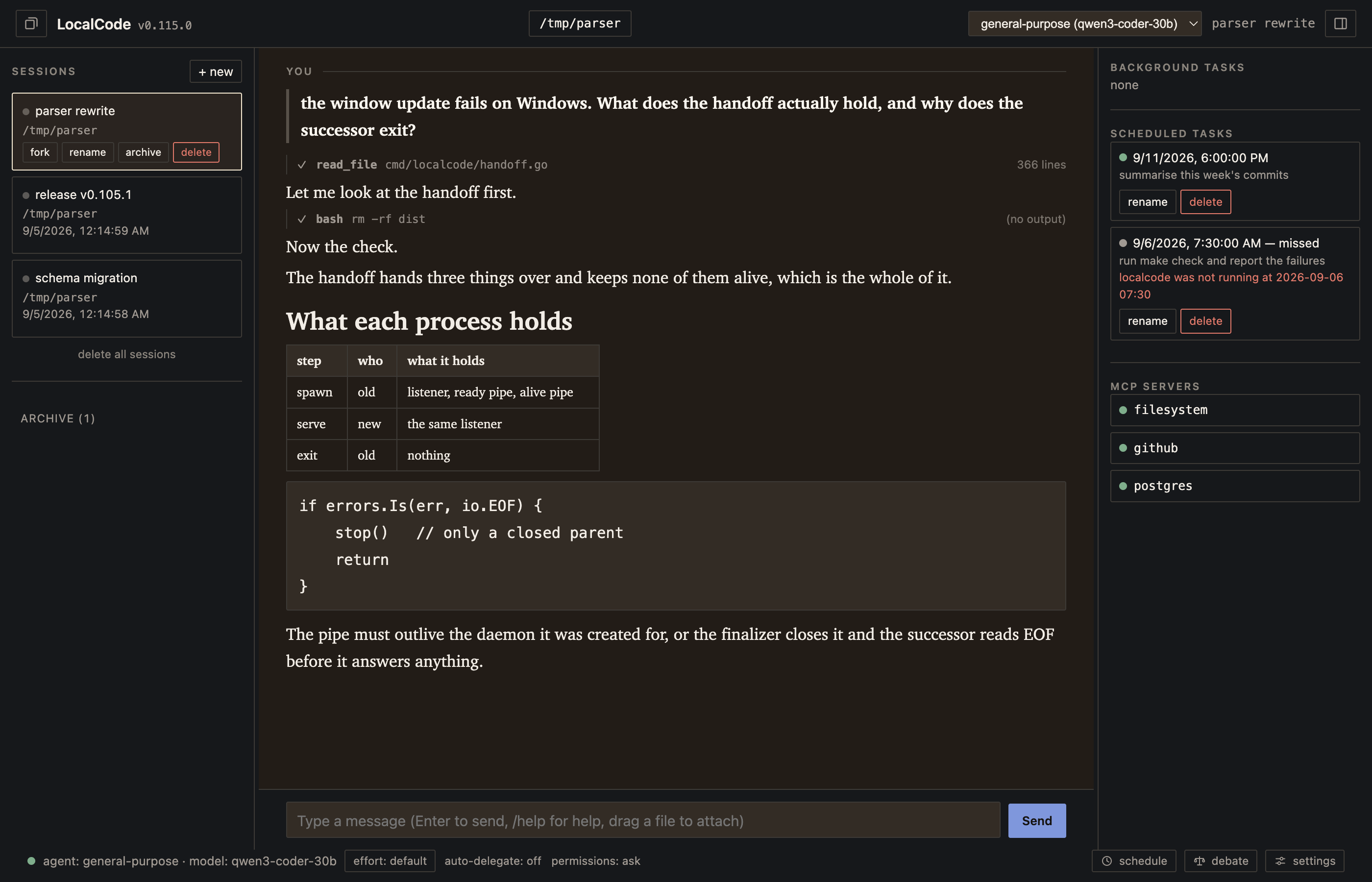
| Front end | How it starts | Suited to |
|---|---|---|
| Terminal (TUI) | localcode | Working inside an existing terminal session, over SSH, in tmux |
| Browser | localcode, then open the listen address | Reading long output, drag-and-drop file attach, watching several tasks |
| Native window | A build made with -tags gui: LocalCode.app on macOS, the MSI on Windows | Using localcode as a desktop application. Experimental, and not available on Linux |
| Daemon only | localcode --headless | A remote machine you attach to |
All three render the model's markdown — headings, emphasis, code, lists, blockquotes and links — rather than showing it raw. The terminal does it with a renderer of its own rather than a dependency, so the two differ in two places worth knowing: the terminal nests lists and the browser does not, and the browser lays out tables where the terminal passes them through as lines. Styling is applied when a reply is drawn and never when it is stored, so an exported conversation and a session log carry the markdown a model wrote and no escape sequences.
Use case: showing a running session to someone else
The daemon serves the interface over HTTP, so a second person who can reach that address opens the same live session: the same transcript, the same running tools, the same permission prompts, updating as it happens. Nothing is exported and no copy is made.
# on the machine running localcode
localcode --headless --listen 127.0.0.1:4096

# on the other person's machine
ssh -L 4096:127.0.0.1:4096 you@your-machine
# then open http://127.0.0.1:4096
The same address also takes a second terminal: localcode --server http://127.0.0.1:4096 attaches a TUI to a session someone else is watching in a browser.
Anyone who can reach the listen address gets the entire API, shell execution included. Bind to loopback and share through an SSH tunnel, as above. Do not bind 0.0.0.0 on an untrusted network.
12. The prompt box
Completion and turn navigation
Command completion
Type part of a name and press the right arrow. One completion list includes skills, custom commands, daemon commands and client commands.

- Cyclic completion: each press selects the next match. After the last match, the original text is restored.
- Mid-sentence: a command name completes where it is written, not only at the start of the box.
read the mail, then run /tidfinishes and leaves the sentence on both sides of it alone. - Paths left alone: a slash that does not open a word is not a command, so
internal/tui/coand/Users/me/coare ignored. - Conversation names too: the same key completes a
#<name>reference, spliced into the sentence. - Both clients: the same key, the same list, the same count line.
Moving through your own turns
Use case: finding what you asked, forty turns ago
- Alt + Up and Alt + Down move the view from one of your own turns to the next, skipping everything the model wrote in between. This is how you find a prompt in a session with fifty of them. Browser and desktop window only; the terminal draws the same turn marks but does not bind the keys.
- Up and Down are separate, and move the text: they recall previous prompts into the box, per conversation. The list is refilled from the transcript when a session opens, so reopening a conversation recalls what was asked in it before.
- Why two: reading back what you asked and editing what you asked again are different jobs, and one key cannot do both without taking the other away.
Scrolling up holds the view where you put it, however much the model writes underneath, in both clients and in a background task's own window. Following the newest output resumes when you scroll back to the bottom.
13. Conversation management
Rename, reorder, archive, retrieve
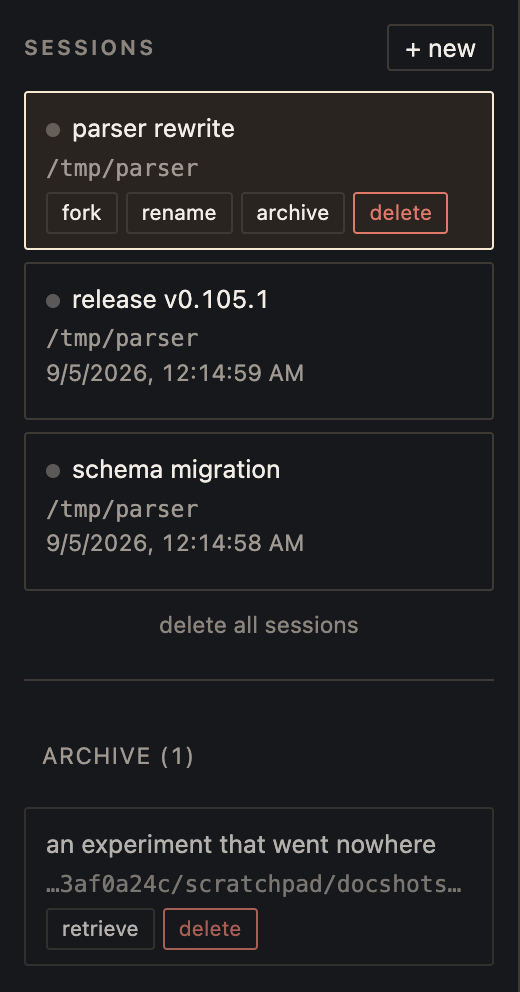
| Action | What it does | Where |
|---|---|---|
| Rename | Gives a conversation a title of your own instead of its generated id. The title is what #<name> resolves against, so renaming is also how a conversation becomes worth citing from another one. | Both clients (/rename) |
| Reorder | Drag a card up or down. The order is saved on the daemon, so it is the same order in every client and after a restart. | Browser and desktop window |
| Archive | Moves a quiet conversation off the list, keeping everything it had, the whole event log included. | Both clients (/archive) |
| Retrieve | Brings it back with one press, restoring its rank rather than its number, and says which. | Both clients (/retrieve) |
| Fork | Copies a conversation, so a different approach can be tried from the same point. | Both clients (/fork) |
| Export | Renders the conversation to a Markdown file from its own log, so an archived conversation exports as readily as an open one. Written rather than printed, 0600. Tool output past 4000 characters is cut, and the file says where. | Both clients (/export) |
Use case: retaining a completed conversation for reference
- Read access: archived conversations retain their messages and event logs.
- Still written to: a background task that outlives the archive still records that it finished.
- Still referable:
#<name>resolves into the archive, so the conversation you put away last month is exactly the one you can still cite. - What it refuses: starting work: a delegation, a background task, a scheduled run. One store-level invariant closes all three at once, rather than a check at each caller.
- Active work: archiving is refused while a turn, background task or scheduled run is active. Deletion cancels active work before removing its records.
14. Paths that leave the project
Workspace boundary
A path that leaves the session's own workspace is its own question, separate from whether the tool is allowed at all. Answering "yes, this agent may read files" is not answering "yes, it may read ~/.ssh".
A second boundary guards destinations rather than paths. network.egress bounds the connections localcode itself makes: the model providers, remote MCP servers, the update check. The list holds host names and *.base entries; loopback is always allowed and needs no listing. It is enforced only when asked for, so a list can be written down and tried before it is relied on. A shell command and a subprocess MCP server are separate processes with their own sockets and stand outside it, and the setting says so rather than implying otherwise.
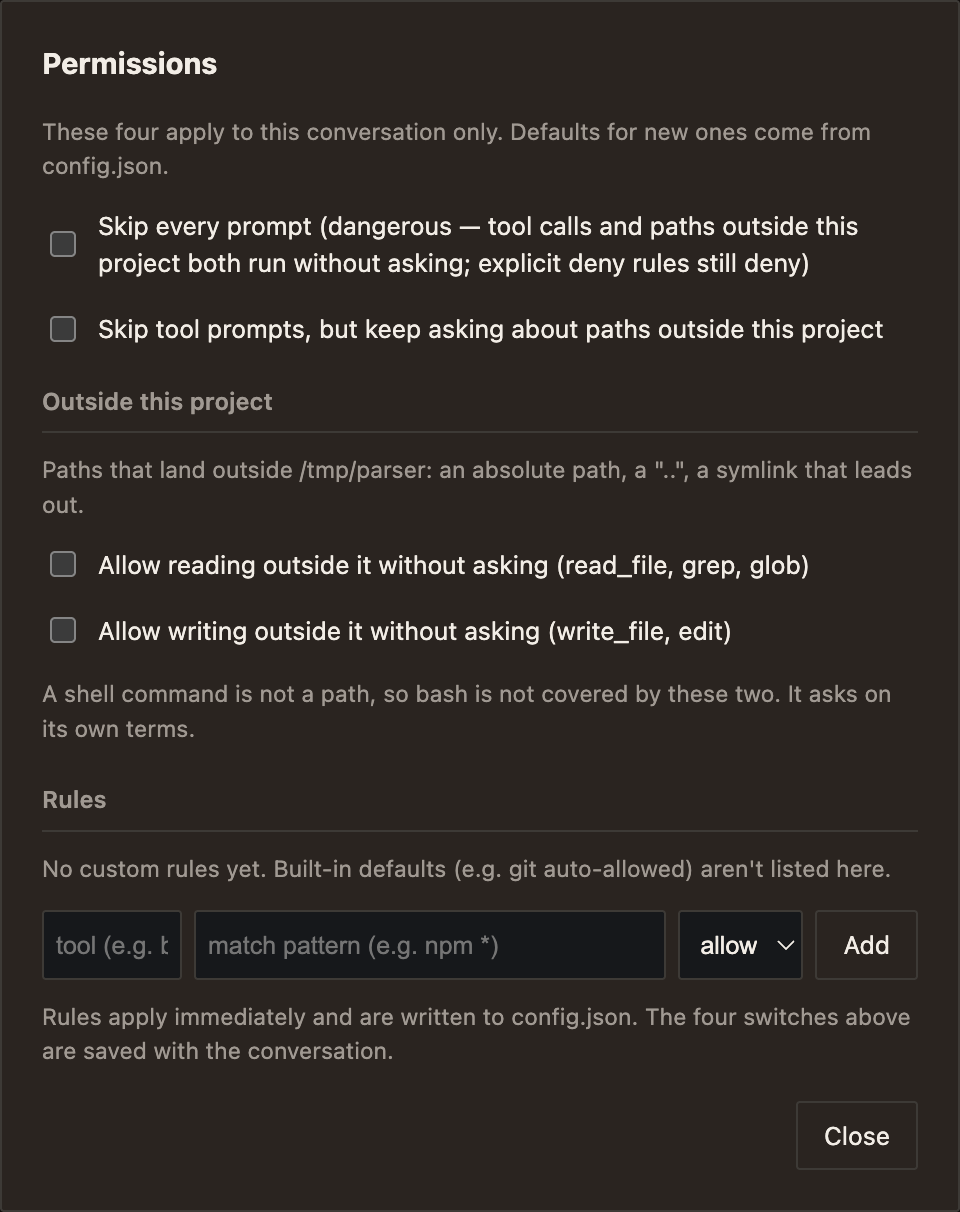
| Case | Treatment |
|---|---|
An absolute path, or one containing .. | Resolved, then judged against the session's workspace |
A symlink inside the workspace pointing at ~/.aws | Outside. The resolved physical path determines access |
| A file about to be created | Judged by where its link leads, before it exists |
| A path that cannot be resolved at all | Requires permission |
A credential store: .env, *.pem, id_rsa, ~/.ssh, ~/.aws/credentials, .netrc | Refused outright with Smart Agent on. Deny class, so no skip unlocks it; a rule for the same tool in config.json does, which is how a project that must edit a .env says so |
| A shell command that leaves the workspace | Not covered by these two, and the dialog says so: a shell command is not a path. bash asks on its own terms |
Use case: one project, one boundary, several sessions
- Per session: the boundary is the workspace of the session asking, so two conversations in two projects on one daemon each have their own.
- Covered:
read_file,grepandglobas reading;write_fileandeditas writing. - Answers available: allow once, allow this directory for the rest of the session, allow outside generally, or deny. The tool-level "allow for this session" and "always allow" are deliberately withheld here — a place is answered by place, at one of two sizes. The remembered ones can be forgotten again with
/read-outside mem-clear. - From the terminal:
/read-outsideand/write-outsideset the same two switches, and/permission-skip-toolsdeliberately skips tool prompts while still asking about paths that leave the project.
Smaller differences
| Area | What differs |
|---|---|
| Search results | A 200-match cap, a line over 1MB and an unreadable file are each named in the output. Paths, at most three, rather than a count. With Smart Agent on, no single file may take more than 30 of grep's 200 results. |
| Lifecycle hooks | Beyond tool hooks: pre_model (block a request, or inject a fact the model could not look up), post_model, delegate (refuse a sub-agent, which a prompt cannot do), compact, retry. A hook may carry "timeout" in seconds (30 by default) and "fail_closed": true, which blocks the action when the hook never finishes — killed at its timeout, or unable to start. Off by default: a hook that cannot run and blocks everything locks somebody out of their own tools, the more common accident. A hook that ran and exited non-zero has decided, so fail_closed does not touch it. |
| Per-session workspace | Two sessions in two projects on one daemon. Only that session's own turn blocks its own switch. /workspace reports the directory and moves it; a move waits for an idle session the way /clear and /rewind do, and the other client's button follows on a workspace.changed event. |
| Review | /review reads what changed — the uncommitted diff by default, or staged, head, a revision, a range or a path — and says what is wrong with it, worst first, modifying nothing. A custom command of the same name wins: the name was in people's .localcode/commands before the built-in existed. |
| Status and debug | /status reports what is attached: every MCP server with connected, degraded or disconnected and the last error, plus skills, custom commands, agents and the workspace. /debug prints version, platform, session, agent, model, effort, workspace and config as one plain block to paste into a bug report. Both are answered by the daemon, so both clients read the same answer. |
| MCP servers | /mcps lists every server with whether it is working and whether this conversation uses it. /mcps off <server> hides that server's tools from the next request here; the server stays connected, because another conversation may be using it and reconnecting is the expensive part. |
| Usage | /usage answers for this conversation. /usage all|today|week|month counts every conversation from the logs at the moment it is asked, archived ones included; a turn that was later undone still cost what it cost, so it is still counted. |
| Sampling | temperature, top_p and top_k live on the profile — muse's own vLLM recipe names all three with temperature 1.0. top_k is a vLLM extension on OpenAI-compatible endpoints, sent only when set, and travels in additionalModelRequestFields on Bedrock. Both are dropped while a Claude model is reasoning, and out-of-range values are refused at load rather than mid-turn. |
| Effort | off, low, medium, high, xhigh, per profile, or per conversation and per model within it. Only the levels a model tells apart are offered. Unset sends nothing, so an unchanged setup produces byte-identical requests. |
| Steering | A message typed during a turn reaches that turn at the model's next tool call, in the order typed. |
| Nearly-right tool names | A decorated name that unambiguously means one tool the agent has runs it and says which spelling worked. Resolution searches only the tools that agent was offered, so a misspelling cannot reach past a tools restriction. |
| Model-specific handling | Selected by model ID: continuation instructions for muse models that stop during a task, a note asking Gemma for the character itself rather than LaTeX. The Web UI unwraps the LaTeX that arrives anyway, whoever wrote it. |
| Config from the environment | Any string may be {env:NAME} or {env:NAME:-fallback}. A missing variable is an error naming it and the field that asked for it, not an empty string that fails later as a 401. |
| Event delivery | A client that falls behind is told rather than silently skipped: the stream ends, it reconnects, and it replays what it missed from the session log with no gap and no duplicate. |
| Linux install | No root: a static binary in ~/.local/bin, nothing written outside $HOME. A .deb and a portable tarball where root is available. |
Parity, not difference
These are deliberately the same as elsewhere, and are listed so the tables above read as a difference rather than a feature count.
- Undo and clear:
/rewindand/clearfollow Claude Code's scope on purpose. - Project context:
AGENTS.mdwith@pathimports and aCLAUDE.mdfallback.~/.claude/CLAUDE.mdapplies, so an existing setup is reused rather than replaced. - MCP: all three transports, and
localcode mcp import-claudepulls an existing Claude Code setup. - Skills and custom commands: the same directory conventions and progressive disclosure.
- Tool hooks:
pre_tool_use,post_tool_use,user_prompt_submit,stop,session_start. - Permissions: allow once, allow for session, always allow, the last written into config.json.
- Compaction: on demand and automatic past a threshold.
- Prompt history recall: Up and Down in the prompt box, as in any shell.
Qualifications
- The comparison column describes a general baseline across coding agents in common use as of 2026-09-01, and was not re-surveyed when the localcode column was checked against v0.122.0, not a feature audit of any one product. These tools ship frequently, and a capability listed as absent may exist by the time this is read.
- Part 2 is not uniformly unique. Sharing one live session between front ends, and moving the view between your own turns, are uncommon. Rename, reorder and fork are conveniences that several tools have in some form; they are here because this page is also about what using localcode is like.
- Every localcode claim is a shipped behaviour at v0.122.0, documented in USAGE.md and covered by the repository's test gate.
- Benchmark numbers are one run of 25 instances and the spread between agents is inside run-to-run variance. See the benchmark page for what it does and does not support.
- One capability is marked experimental in the product: the native desktop window. Updating on Windows was the other rough edge at v0.84.0, when it applied the new version but could not restart localcode; since v0.87.0 it hands the daemon over like every other platform, and since v0.88.0 it does so at startup as well.